On this page
- How are Formulo and Aulaclic different?
- Which Aulaclic version is yours?
- How do you practice in each one?
- What does each one have?
- Do they prepare you for an Excel test at an interview?
- How much does each one cost?
- Where does Aulaclic win?
- How do you use Aulaclic and Formulo together?
- Why practice on Formulo?
- Which one suits you?
- Frequently asked questions
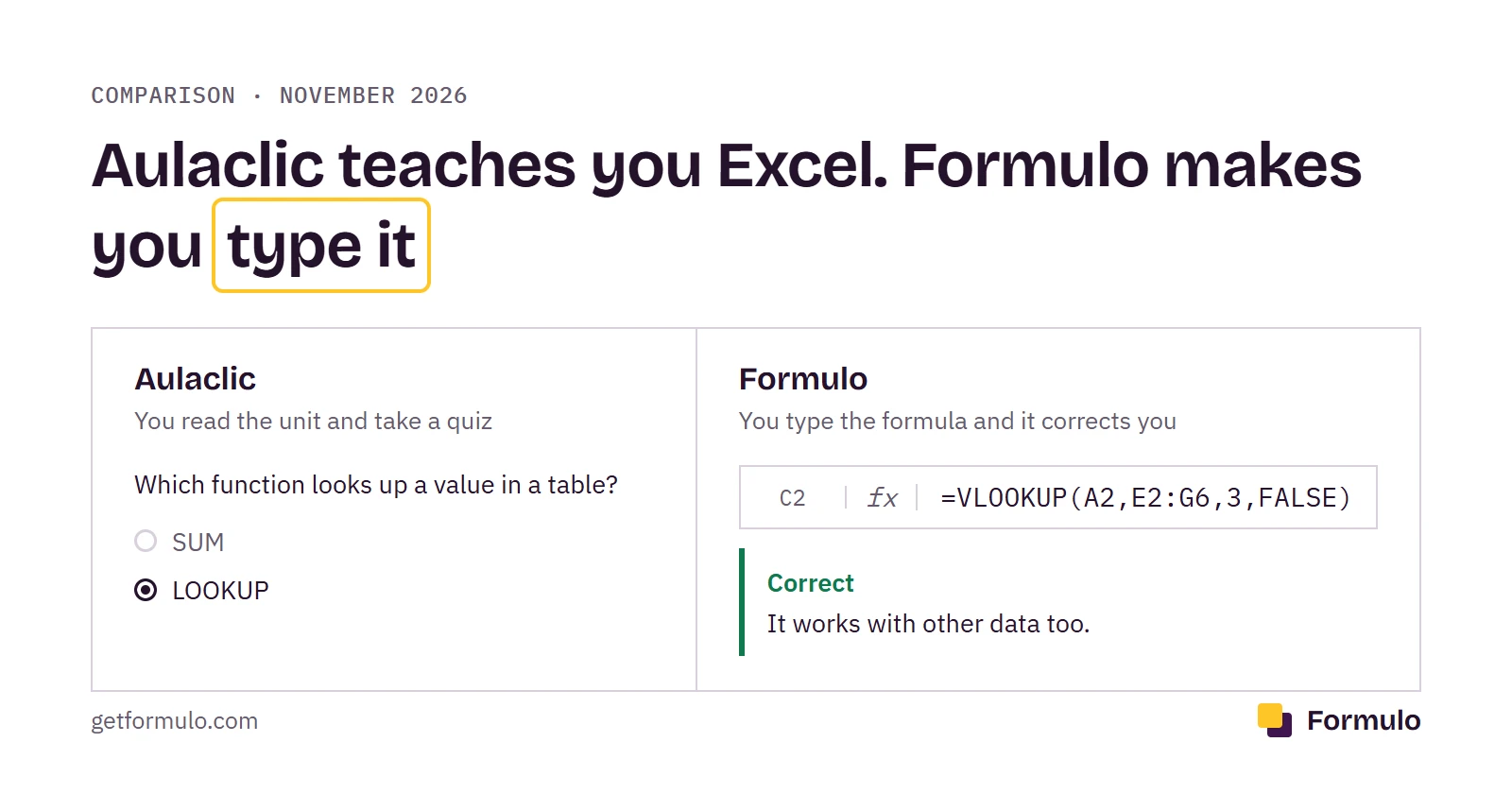
If you learned Excel in Spanish, chances are you went through Aulaclic. It has explained Office unit by unit since 1999, free and without asking for so much as an email. For understanding what an absolute reference is or where the PivotTable button lives, it is still among the best there is in Spanish.
Formulo does something else. It doesn't explain units: it gives you a task and a sheet, and tells you whether the formula you typed is right. It is our product, so we know it by heart.
So the useful question is not which one is better, but what you are missing. If you are missing the understanding of Excel, Aulaclic. If you understand it but freeze in front of the empty cell, you are missing practice, and Formulo is built for exactly that. Many people need both, in that order, and at the end of the page we leave the route to do it.
The formulas on this page are written for English Excel, with commas. Some countries (Spain and much of Europe and Latin America) use semicolons between arguments in Excel: =VLOOKUP(A2;E2:G6;3;FALSE). Aulaclic and Formulo's exercises are in Spanish, so you will see the Spanish names too: VLOOKUP is BUSCARV there.
In this comparison:
- How are Formulo and Aulaclic different?
- Which Aulaclic version is yours?
- How do you practice in each one?
- What does each one have?
- Do they prepare you for an Excel test at an interview?
- How much does each one cost?
- Where does Aulaclic win?
- How do you use Aulaclic and Formulo together?
- Why practice on Formulo?
- Which one suits you?
How are Formulo and Aulaclic different?#
Formulo and Aulaclic differ in what you do with your hands. In Aulaclic you read, watch an animation and answer a quiz. In Formulo you type a formula and Formulo checks it instantly.
Aulaclic's Excel 2016 course has 20 units. It starts at the Excel screen and goes up to charts, PivotTables and macros. Each unit has its explanation, step-by-step exercises to do in your Excel (about 25 in the whole course) and a 10-question multiple-choice test. It is a good Excel textbook, open and free.
Formulo has 121 exercises in 10 topics, and all of them are about formulas. You read two lines ("bring in the price for the code in A2"), type and press Check. There is no long theory, just a short explanation in each exercise and a separate function guide.
The other difference is the version. Aulaclic has a course for each Excel, from 2002 to 2016, with that version's screens. Formulo's sheet works like current Excel, with functions like XLOOKUP that don't exist in Excel 2019 or earlier. The long-standing ones, like VLOOKUP, IF or SUMIF, are the same in all of them.
And there is the price. Aulaclic is free from start to finish. Formulo lets you do 3 exercises with no account, and the rest (the 10 topics, the mock exams and the certificates) needs a plan: $7.99 a month or $14.99 for 3 months.
Which Aulaclic version is yours?#
If you have Excel 365, 2021 or 2024, the Aulaclic course for you is Excel 2016: there is no full course for any later version. It sounds odd, but it is the question behind almost everything people search about Aulaclic, which always carries a year: 2016, 2019, 365.
What it does have is two additions. The "Excel 2019 course" on its home page is really unit 20 of the 2016 course, "Ampliación a Excel 2019". And for Excel 365 it published a series of 36 YouTube videos in December 2025. So the route for a current Excel is: the 2016 course, unit 20 and the videos.
What do you miss with that? The functions that arrived after 2016. To find out which version you have, in Excel go to File > Account > About Excel, and find your row:
| Your Excel | Aulaclic course | Functions in your Excel that the written course doesn't explain |
|---|---|---|
| Microsoft 365 | Excel 2016 + unit 20 + 365 videos | those of Excel 2024, plus GROUPBY and PIVOTBY |
| Excel 2024 | Excel 2016 + unit 20 | XLOOKUP, FILTER, UNIQUE, SEQUENCE, LET, TEXTSPLIT |
| Excel 2021 | Excel 2016 + unit 20 | XLOOKUP, FILTER, UNIQUE, SEQUENCE, LET |
| Excel 2019 | Excel 2016 + unit 20 | none |
| Excel 2016, 2013 or 2010 | The course for your version | none |
Unit 20 covers the functions Excel 2019 brought: IFS, SWITCH, CONCAT, TEXTJOIN, MAXIFS and MINIFS. The 365 videos cover GROUPBY, PIVOTBY and TEXTSPLIT, but as video, with no text or quiz.
Of that column, the one that matters most for a job test is XLOOKUP. If your Excel has it, learn it with the XLOOKUP guide: it does the same as VLOOKUP with fewer traps. If it doesn't, no problem, VLOOKUP works in every version and is the one that comes up most.
One detail people forget: if you type XLOOKUP and send the file to someone with Excel 2019 or earlier, they will see #NAME? instead of the result. If you don't know which Excel the person opening your file has, use VLOOKUP.
How do you practice in each one?#
In Aulaclic you practice in your own Excel and nobody checks your formula; in Formulo you type in a sheet in the browser and Formulo checks it instantly. It shows best with the same task in both: looking up a value in a table, which comes up most in Excel tests.
In Aulaclic, lookup is in unit 6, "Las funciones". The step-by-step exercise asks you to open your Excel 2016, type 10 names with their phone numbers and use LOOKUP from Formulas > Insert Function. You follow the steps, see whether the phone number appears and save.
It is well explained, but it has two catches: it uses LOOKUP and not VLOOKUP, which is the one they will ask you for, and nobody checks what you typed. If you slip without noticing, you keep the error. The unit's test is 10 multiple-choice questions with a "Corregir" (Check) button, so it measures whether you recognize the answer, not whether you can type it.
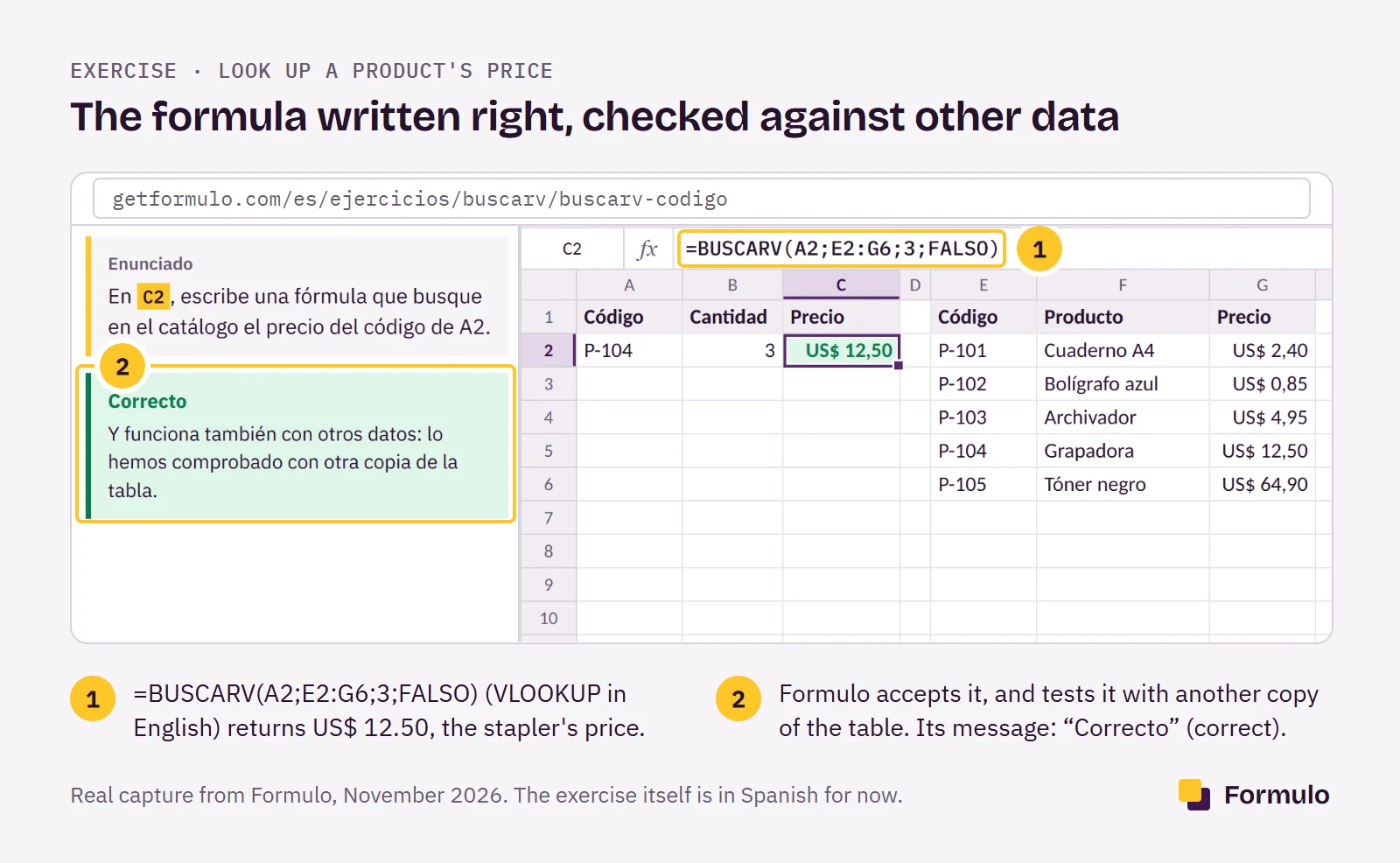
In Formulo, the task is the exercise "Look up a product's price". You have an order with the code P-104 in A2 and a catalog of 5 products in E1:G6. In C2 you type:
=VLOOKUP(A2,E2:G6,3,FALSE)
The formula returns $12.50, the stapler's price. Formulo accepts it and also tests it against another copy of the catalog, to check it didn't work by luck.
The interesting part is getting it wrong. If you put column 2 instead of 3, C2 shows "Grapadora" (stapler) and Formulo tells you the expected result is different and to count the columns from the start of the range. And if you forget the FALSE, something sneakier happens: the formula gives $12.50, the right result, but Formulo warns you that it "works here, but fails with other data". Without FALSE, VLOOKUP does an approximate search and is only right if the table is sorted.
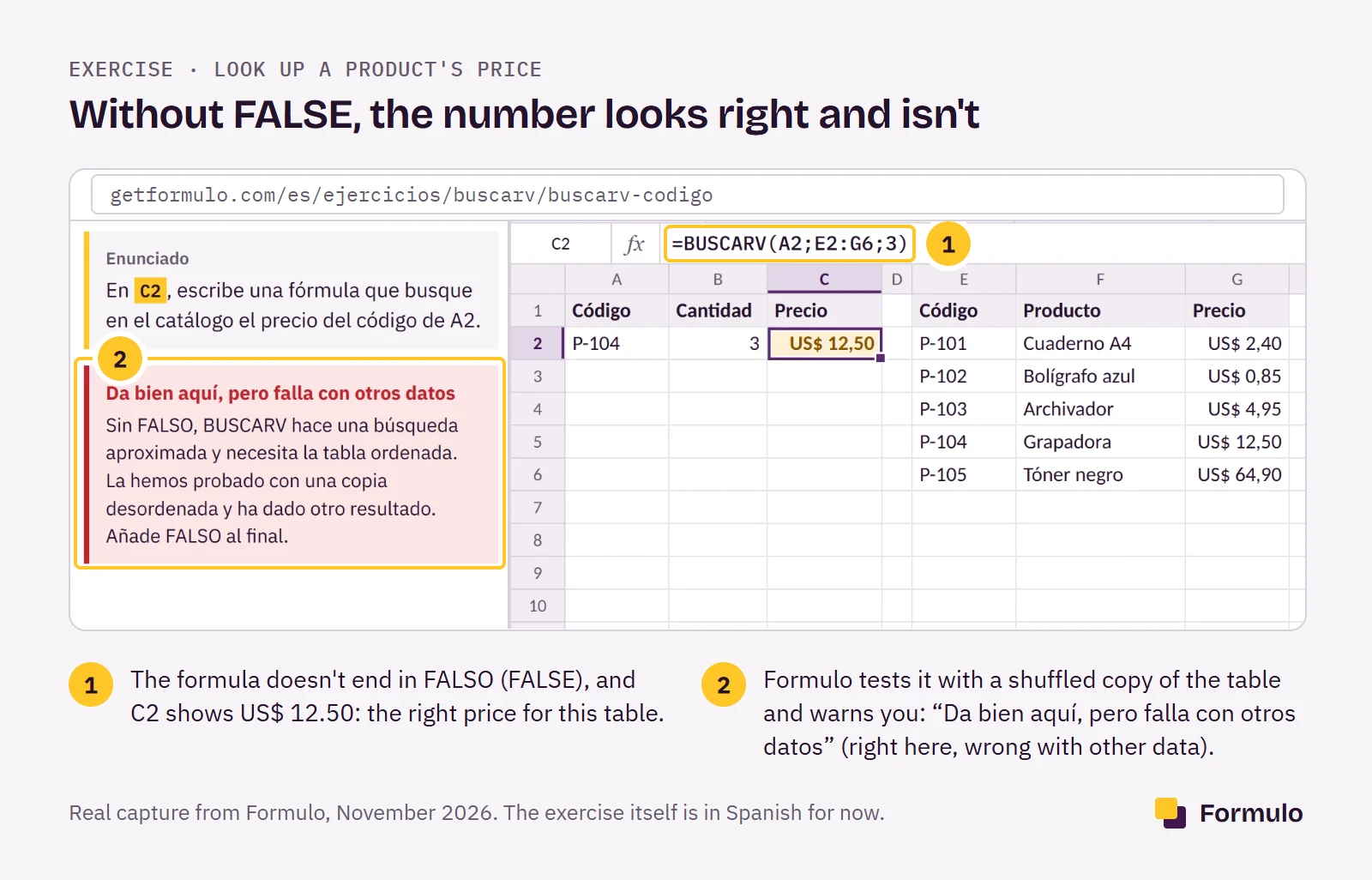
That second mistake is the one that costs most in a test, because in your own Excel you don't see it: the number looks correct. At the company, with their shuffled table, it isn't. If you ever handed in a sheet that "worked" and a week later someone asked why the prices didn't add up, you know this error. Formulo shows it to you before it matters, and that is the difference between knowing VLOOKUP and getting it right when it counts.
What does each one have?#
Aulaclic covers all of Excel, and the rest of Office, in theory. Formulo covers only formulas, but with checked practice. Data as of November 2026.
| Aulaclic | Formulo | |
|---|---|---|
| Theory | A course per version, from 2002 to 2016 | A short explanation in each exercise + a function guide |
| Video | Animations in each topic; 36 Excel 365 videos | No |
| Where you practice | In your own Excel | In a sheet in the browser, with no Excel needed |
| Formula checking | No: multiple-choice quizzes | Yes, against another copy of the data |
| Mock exam with a clock | No | 10 exercises in 30 minutes, no hints |
| Certificate | No | One per topic, with a link to verify it |
| Charts, PivotTables, formatting, macros | Yes | No |
| Account | Not needed | Not for the 3 free exercises |
| Ads | Yes | No |
| Phone | Lessons can be read on a phone; to practice you need Excel | The sheet fits small screens; for long formulas, better with a keyboard |
Two more things worth knowing about Aulaclic: since December 2023 it no longer sells or lets you download its courses, and it doesn't allow them to be used in academies or schools. The exercise files, however, can be downloaded free and without signing up.
Do they prepare you for an Excel test at an interview?#
Aulaclic prepares the theory for an Excel test; Formulo trains you in its format: formulas in a sheet, against a clock. In many selection tests they give you a file, 20 or 30 minutes and a list of tasks: look up prices, mark who meets a condition, add up by region. What they look at is your formulas. That is why Formulo's mock exams are exactly that: 10 exercises in 30 minutes, no hints, with a score at the end.
But some tests ask for a chart or a PivotTable, and there Formulo doesn't help. If the job ad mentions them, read units 12 and 17 of Aulaclic and practice them in your Excel.
How much does each one cost?#
Aulaclic charges nothing and is funded by ads in the lessons. Formulo is free for the first 3 exercises, the function guide and the shortcuts; the rest needs a plan. Prices as of November 7, 2026:
| Aulaclic | Formulo | |
|---|---|---|
| Monthly plan | Free | $7.99 a month, cancel anytime |
| 3-month pass | Free | $14.99, one payment that doesn't renew |
A real case: you have an Excel test in 4 weeks. With Aulaclic it costs you $0. With Formulo, $7.99 if you cancel the monthly plan before the second month, or $14.99 if you prefer the pass and forget about it. Both are on Formulo's plans.
Where does Aulaclic win?#
Aulaclic wins on almost everything that isn't typing formulas, and on price. It is free and asks for no account.
It also covers all of Excel: formatting, printing, charts, PivotTables and macros each have a unit, and Formulo has none of those. If your office works with Excel 2010 or 2013, Aulaclic teaches you with the same screens you will see. And if the job ad asks for "Office skills", it also has Word, PowerPoint and Access.
It also wins if you start from zero. Formulo assumes you know what a cell is and how to type a formula. If you have never opened Excel, unit 1 of Aulaclic is a better starting point than our first exercise.
How do you use Aulaclic and Formulo together?#
The combination that works best is plain: you read the unit in Aulaclic and practice the topic on Formulo until the formula comes out without looking. This table links the units of the Excel 2016 course to Formulo's topics:
| Aulaclic unit (Excel 2016) | Formulo topic |
|---|---|
| 2 and 5 (Getting started, Data) and 6.1–6.2 (Entering functions, AutoSum) | 1. First formulas (free) |
| 6.3 Insert function (references and names) | 2. Absolute and mixed references |
| 6.8 Other functions (IF, AND and OR, in the advanced section "Trabajando con otras funciones") | 3. Deciding with IF, 6. Combined conditions |
| No unit: the course doesn't explain COUNTIF or SUMIF | 5. Counting and adding with conditions |
| 6.6 Lookup functions and 6.9 Error handling | 4. VLOOKUP, 7. Looking up data without VLOOKUP |
| 6.5 Text functions | 8. Working with text |
| 6.4 Date and time functions | 9. Dates and deadlines |
| 7, 12 and 17 (Formatting, Charts, PivotTables) | Only in Aulaclic |
If you don't know where to start, do topic 1 on Formulo, which is free. If the formulas come out on their own, carry on with the topics. If you struggle, go back to the Aulaclic unit and repeat.
Why practice on Formulo?#
Practice is the part that decides the test. You can read all 20 units of Aulaclic and still go blank in front of the empty cell, with the clock running. Reading more doesn't fix that; typing formulas until they come out on their own does.
Formulo is built for that. You type in a sheet that works like Excel, with Spanish function names and semicolons, and every formula is checked instantly with a message that tells you what to fix. The 121 exercises cover what comes up in selection tests and civil-service exams, and the mock exams give you 10 exercises in 30 minutes, no hints, so test day isn't the first time. When you finish each topic you get a certificate with a link that the company can verify.
The first 3 exercises are free and need no account. They are in Spanish for now.
Which one suits you?#
Aulaclic suits you for learning Excel from zero and everything that isn't formulas; Formulo, for practicing formulas until they come out on their own before a test. Case by case:
If you have an Excel test this week, Formulo, no doubt. Do the VLOOKUP, IF and references topics, and at least one timed mock exam: you arrive having taken the test once. If the test includes PivotTables, add unit 17 of Aulaclic.
If you are starting from zero, Aulaclic, units 1 to 6. When you finish, try topic 1 on Formulo to see whether what you read comes out in your typing.
If your office uses Excel 2010 or 2013, Aulaclic, in the course for your version. You can still practice on Formulo; just skip the XLOOKUP and CONCAT exercises, which your Excel doesn't have.
If you already use Excel at work, Formulo. You have the theory; what Formulo gives you is closing the specific gaps (SUMIF, references with $, text, dates), topic by topic.
And if you are a teacher or run an academy, Aulaclic doesn't allow its courses to be used in class. Formulo has a plan for groups; write to us.
Do you work at Aulaclic and something on this page is wrong? Write to us from contact and we will fix it within 48 hours.
What changed on this page: November 7, 2026, first version.
Start with the 3 free exercises. They need no account, and in 10 minutes you know whether practicing this way was what you were missing.
Sources
- aulaclic.es: Quiénes somos, Preguntas frecuentes, the Excel 2016 course index, unit 6 ("Trabajando con otras funciones", the test and the exercise "Funciones que buscan") and unit 20 ("Nuevas funciones"). November 2026.
- Microsoft Support: "Excel functions (by category)", November 2026.
- Formulo: published topics and exercises, and prices from the payments configuration, November 7, 2026.
Frequently asked questions
- 01Is Aulaclic good for learning Excel for work?
- Yes, for the theory: Aulaclic explains all of Excel, from the screen to PivotTables. For the practical test at an interview you still need to type formulas against a clock, and that is practiced on Formulo.
- 02Which is better, Aulaclic or Formulo?
- It depends on what you are missing. Aulaclic is better for learning the theory for free; Formulo is better for practicing checked formulas and preparing for a test with mock exams. Many people use both, in that order.
- 03Is Aulaclic free?
- Yes. Aulaclic's courses, quizzes and exercise files are free and need no account. Aulaclic is funded by ads.
- 04Does Aulaclic give a certificate?
- No. Aulaclic gives no diploma or certificate when you finish its courses. If you need a free one, see the free Excel courses with a certificate.
- 05Does Aulaclic have exercises that check your work?
- Only the quizzes. Aulaclic's multiple-choice quizzes mark themselves, but the formula exercises are done in your own Excel and nobody checks them. Formulo checks every formula you type.
- 06Which Aulaclic course do I take if I have Excel 365?
- The Excel 2016 one, plus its unit 20 (Excel 2019) and the 36 Excel 365 videos. Aulaclic has no full course for Excel 365, 2021 or 2024.
- 07Is there an Excel 2019 course on Aulaclic?
- Not as a separate course. Excel 2019 is unit 20 of the Excel 2016 course, "Ampliación a Excel 2019".
- 08Does Aulaclic have an Excel 365 course?
- Aulaclic has 36 YouTube videos about Excel 365, from December 2025, but not a course in units.
- 09Does Aulaclic have advanced Excel?
- Aulaclic's Excel 2016 course goes as far as PivotTables, macros and lookup functions. It has no separate advanced course.
- 10How much does Formulo cost?
- The first 3 exercises are free. The monthly plan is $7.99 and the 3-month pass is $14.99, in one payment that does not renew.
- 11Can I use them on my phone?
- Aulaclic's lessons can be read on a phone, but to practice you need Excel. The Formulo sheet works in a phone browser; for long formulas, a keyboard helps.
- 12Do I need Excel installed?
- To practice with Aulaclic, yes. For Formulo, no: the sheet runs in the browser.
- 13What are the alternatives to Aulaclic?
- GCFGlobal (free, with videos), Capacítate para el Empleo (free, with a certificate) and Coursera (free course, paid certificate). We compare them in free Excel courses with a certificate.
Do you work at one of these sites and something is off? Write to us and we'll fix it within 48 hours.
Try the difference in two minutes
Type your first formula and see how it gets checked. No sign-up.