Free Excel courses with a certificate in 2026
Nine Excel courses, checked on their official pages: which ones give the certificate for free, which ones charge for it, and what to do before the Excel test.
Facts checked by hand on November 7, 2026
Free course and free certificate: SENA (Colombia), UNAM Aprendo+ (Mexico) and Capacítate para el Empleo, inside its office-skills course. Edutin and Alison give the course free and charge for the certificate; Coursera charges for it, with financial aid. GCFGlobal and Aulaclic are free, with no certificate.
On this page
- 1. Formulo: the practice that turns the course into skill
- Which courses give the certificate free?
- Which courses charge for the certificate?
- Which courses are free, with no certificate?
- How do you know if a "free" course charges for the certificate?
- How do the 9 courses compare?
- Does Google have a free Excel course with a certificate?
- What is there in your country?
- What is an Excel certificate worth on your CV?
- Does a free course prepare you for the Excel test?
- Which one should you pick?
- Frequently asked questions
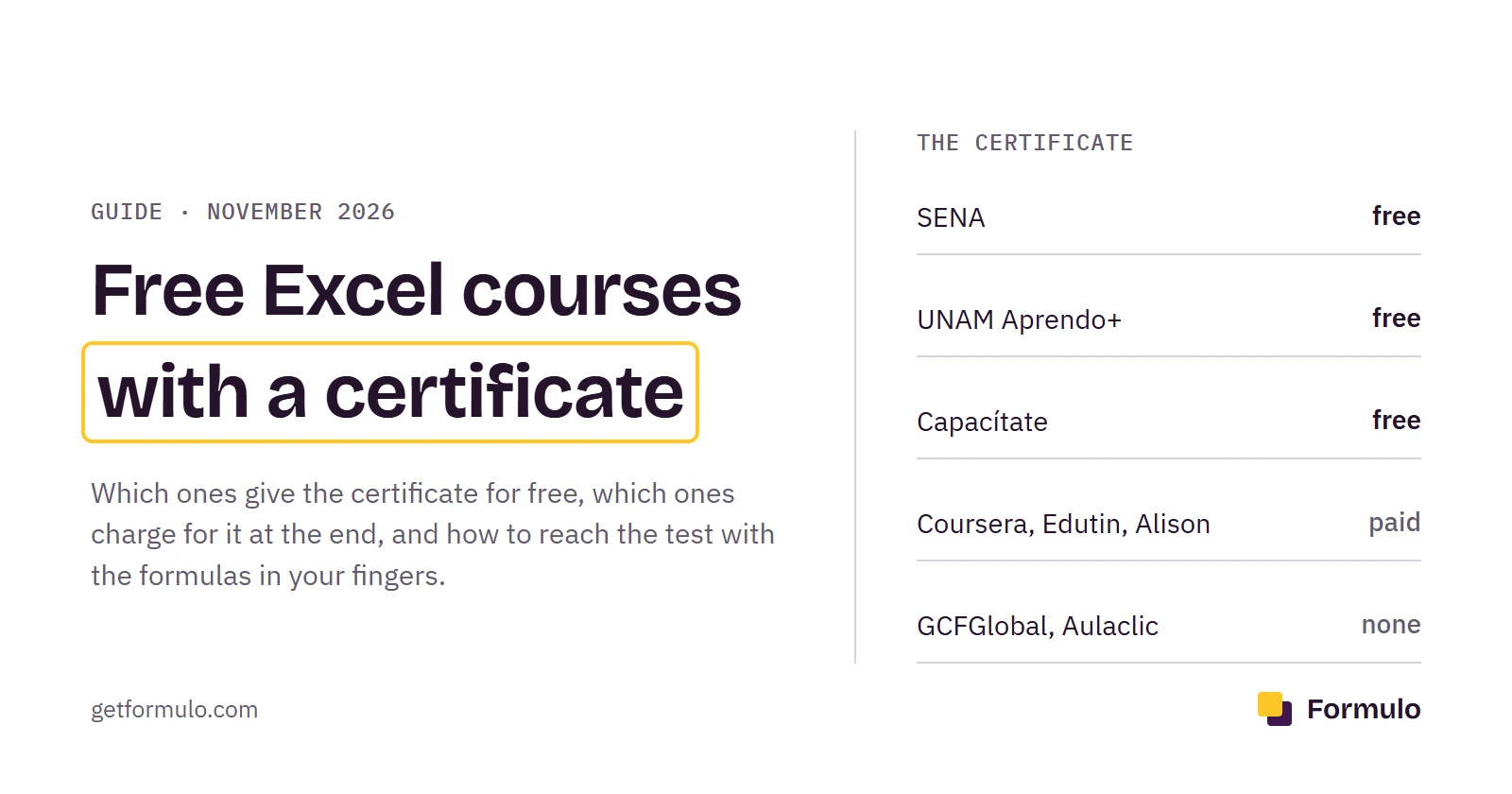
Search "free Excel course with certificate" and dozens come up. Open them one by one and the "free" often stops at the course: you pay for the certificate at the end, after you have done the hours. Of the nine options on this list, only three give you the course and the certificate without paying anything: SENA in Colombia, UNAM Aprendo+ in Mexico and Capacítate para el Empleo.
Before the list, something almost nobody says. A certificate gets you past the CV filter, and that is not nothing.
But at many companies, after the filter comes a practical test: they hand you a file, half an hour and a list of tasks. There the certificate does nothing; what counts is whether the formula works. That is why this list starts with Formulo, the part that prepares you for that test.
On this page:
- Formulo: the practice that turns the course into skill
- Which courses give the certificate free?
- Which courses charge for the certificate?
- Which courses are free, with no certificate?
- How do you know if a "free" course charges for the certificate?
- How do the 9 courses compare?
- Does Google have a free Excel course with a certificate?
- What is there in your country?
- What is an Excel certificate worth on your CV?
- Does a free course prepare you for the Excel test?
- Which one should you pick?
1. Formulo: the practice that turns the course into skill#
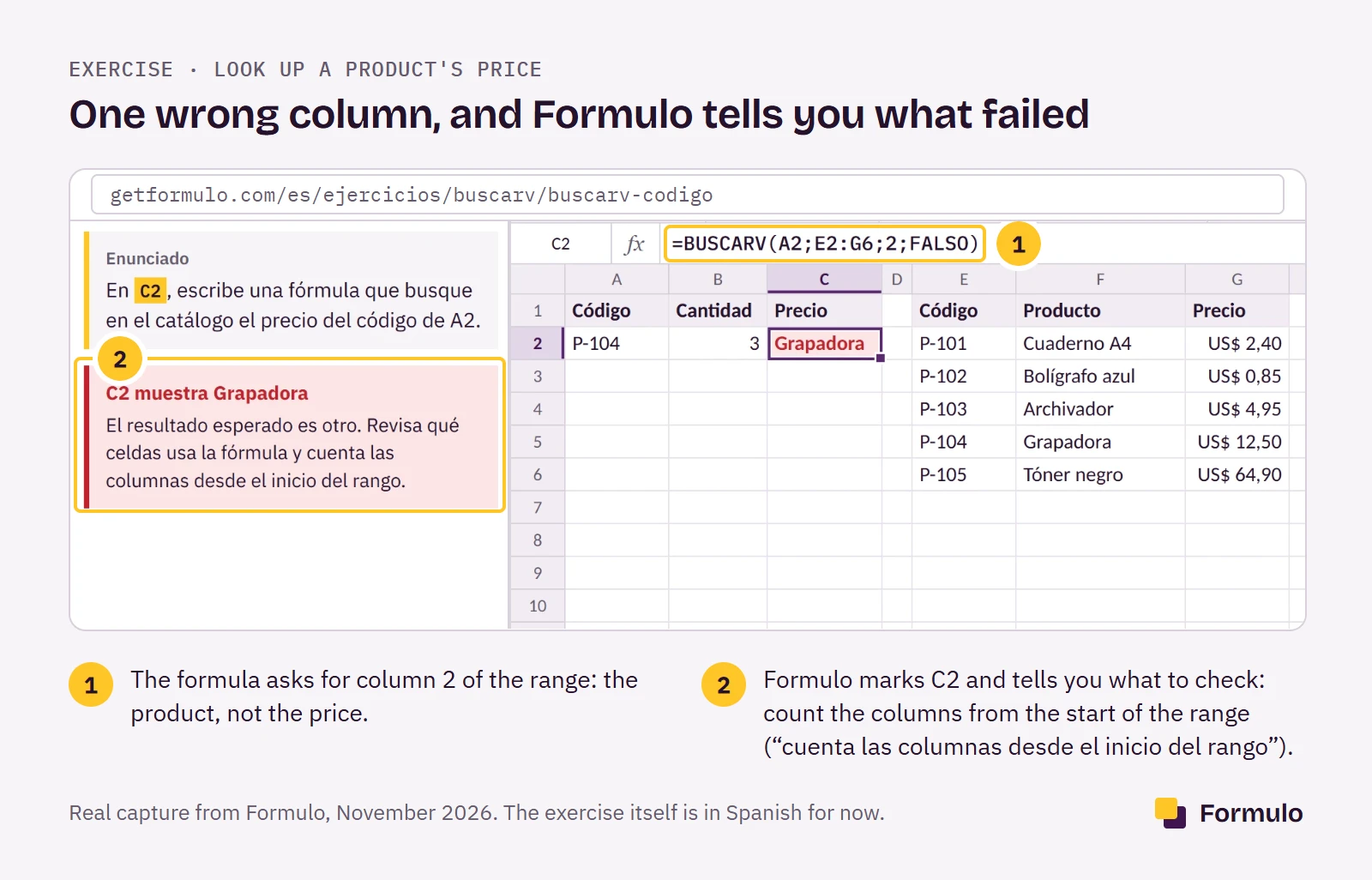
A course teaches you what VLOOKUP (BUSCARV in Spanish Excel) does. Formulo makes you type it until it comes out without thinking, which is exactly what the test asks for. Formulo is a website for practicing Excel: exercises in a real spreadsheet that check your formula instantly, with timed mock exams for job interviews and Excel skills tests.
It is not a course, and it doesn't need to be. Each exercise is a real office task: bring in the price for a code, mark who passed, add up a region's sales. You type the formula, press Check and know in a second whether it is right.
If it isn't, Formulo tells you what failed: "count the columns from the start of the range", not a bare "incorrect". And it tests each formula against another copy of the data, so if yours worked by luck you find out here, not in the interview.
There are 121 exercises in 10 topics, from first formulas to VLOOKUP, IF, SUMIF, text and dates: what comes up again and again in Excel tests. When the test is close, you do the mock exams: 10 exercises in 30 minutes, no hints, with a score at the end. That way, on test day you have done it before.
Every topic you finish gives you a certificate with its own link, which an employer opens and checks. It certifies that you solved every exercise in the topic in the sheet, and that is what the person hiring you wants to know.
You start with 3 free exercises, no account and no card. If it helps, the plan costs $7.99 a month, or $14.99 for 3 months in one payment. The exercises are in Spanish for now, with Spanish function names and prices in dollars, so they suit you best if you work with Excel in Spanish. Take whichever free course on this list fits you best for the theory and the certificate, and use Formulo to reach the test with the formulas in your fingers.
Which courses give the certificate free?#
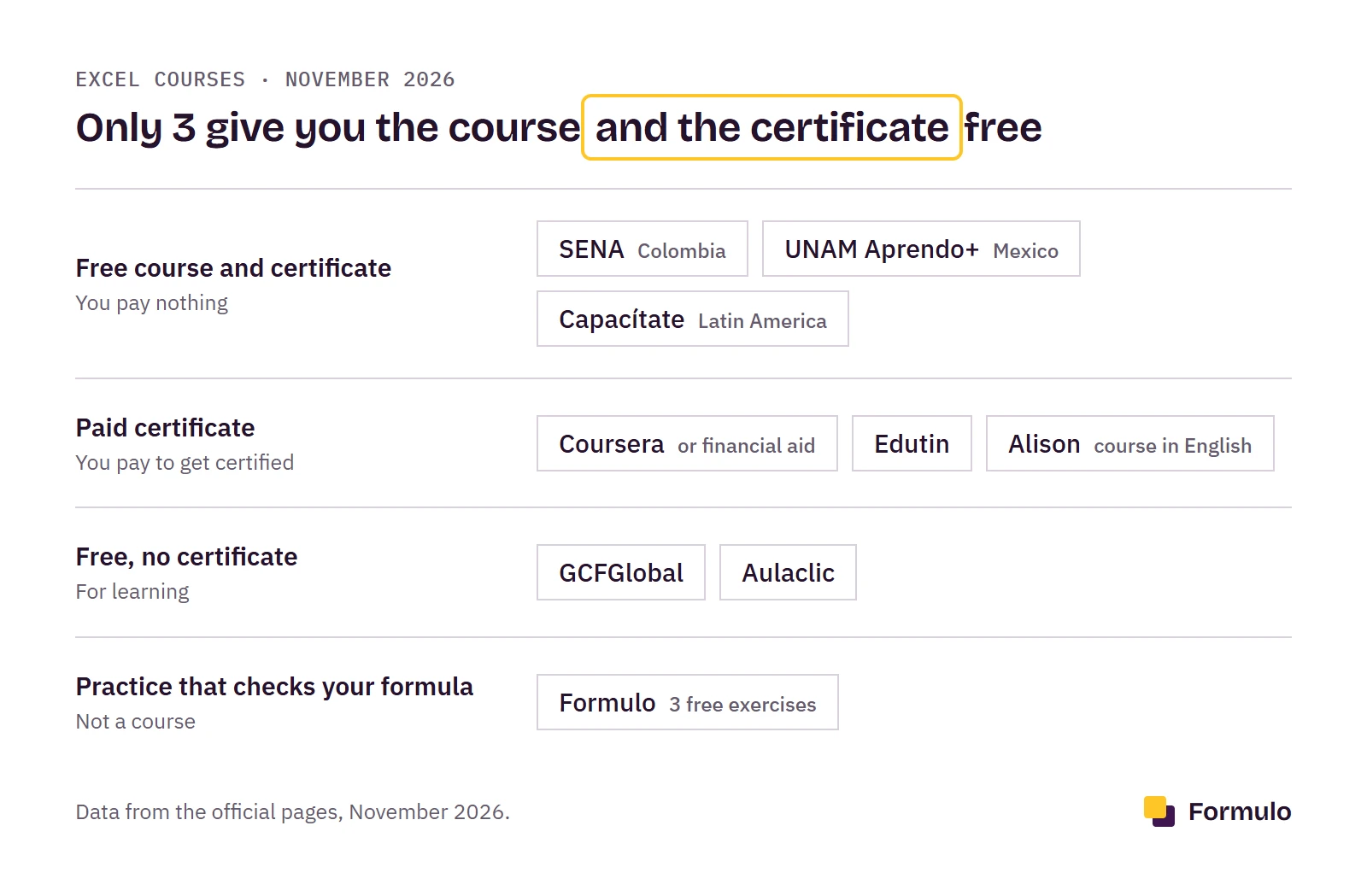
Three Excel courses give the certificate free: SENA, UNAM and Capacítate para el Empleo, from the Carlos Slim Foundation. Behind each one is an institution you know, and each has its fine print.
2. SENA (Colombia)#
SENA gives a free Excel course and certificate in Colombia, and if you live there, it is where to start. It is the public training agency and opens short virtual Excel courses several times a year at no cost. They last between 20 and 48 hours; two of the Excel ones are "Uso de Microsoft Excel en labores operativas y administrativas en el sector productivo" and "Uso de Microsoft Excel para gestión de información", 48 hours each. When you pass, SENA gives you a certificate of approval.
To enroll you need an account on Sofía Plus, SENA's system, to be over 14, and a free seat, because courses open on set dates. The offer changes with each call, so look in Sofía Plus for the open Excel course and its dates.
3. UNAM Aprendo+ (Mexico)#
In Mexico, UNAM has the course "Herramientas básicas de Microsoft Office 2010. Excel" on its Aprendo+ site. It is free, asks for an account (the name you enter is the one printed on the certificate) and takes about 30 hours, in 7 units with a self-test. If you pass all of them with 8 or more, you receive a digital certificate of participation and an Open Badges badge, which you can share on LinkedIn. The certificate has no official curricular value: it shows you finished the course, not a degree.
The catch is the version: it is built on Excel 2010, so the screens don't look like your Excel. The formulas, though, are the same. Even without curricular value, the UNAM name carries weight on a Mexican CV; you will just have to get used to the newer menus afterward.
4. Capacítate para el Empleo (Mexico and Latin America)#
Capacítate, from the Carlos Slim Foundation, is open to all of Latin America and gives the certificate free when you pass. The problem is that it has no Excel-only course. Excel sits inside "Técnico en informática (Ofimática)", a 91-hour, 4-level course that also covers Word and PowerPoint.
If the job ad asks for "Office skills", that is an advantage. If you only want Excel, it is a lot of hours to get to the part you care about.
Which courses charge for the certificate?#
Coursera, Edutin and Alison charge for the Excel certificate; Edutin and Alison let you study free. There is nothing wrong with that, as long as you know before you start.
5. Coursera: Fundamentos de Excel para Negocios#
Coursera gives the best-known certificate on the list: Universidad Austral of Argentina signs it, and the course has 333,458 enrolled learners and a 4.8 rating from 5,598 reviews. It is in Spanish, for beginners, and takes about 2 weeks at 10 hours a week; the same university has an advanced-level course. The certificate comes with a Coursera Plus subscription. If you can't pay for it, apply for Coursera's financial aid: if it is approved, the course and the certificate are free.
6. Edutin#
The Edutin Excel course has 325,335 students and 180 certifiable hours. Studying is free; the certificate is paid, and the price changes with your country. And 180 hours is more than a month of full-time work. Before paying, compare it with the three free ones above.
7. Alison#
Alison has "Microsoft Excel 365: De principiante a profesional", 6 to 10 hours, with the certificate title in Spanish. But the course itself is in English. Studying is free and the certificate is for sale. It is only worth it if you are comfortable in English.
Which courses are free, with no certificate?#
GCFGlobal and Aulaclic are free from start to finish, in Spanish, and ask for nothing. If you don't need a certificate, start here.
8. GCFGlobal#
GCFGlobal is now called LearnFree, and you pick Spanish with the language selector. Its course "Excel: Fundamentos" is 36 lessons, about 5 hours 35 minutes, and ends with an 8-minute quiz. Each lesson closes with a challenge you do in your own Excel with a downloaded file. It is among the clearest for starting from zero, though some translations sound odd: one lesson is called "Paneles de congelación" (Freeze Panes).
9. Aulaclic#
Aulaclic, from Valencia (Spain), has an Excel course for each version, from 2002 to 2016, and 36 videos for Excel 365. It is free, needs no account, and gives no diploma or certificate. It is the free course with the most theory on this list: 20 units, charts and PivotTables included. If you can't decide which version to take, we explain it in Formulo vs Aulaclic.
How do you know if a "free" course charges for the certificate?#
A "free" course charges for the certificate when its page shows a price, a "cost adjusted to your country" or a certify button next to the word certificate. Look for it before you enroll. In Ecuador, for example, the Fundación Perea course "Excel de Cero a Expertos" is free and its certificate costs $25.
Also check who signs it and how it can be verified. A certificate with a link, badge or QR code (Coursera, UNAM Aprendo+, Formulo) can be verified in a minute; a PDF with no code can't. And watch the dates: public courses, like SENA's, open by call, and if there is no seat you wait for the next one.
How do the 9 courses compare?#
Of the 9, only SENA, UNAM Aprendo+ and Capacítate give the course and certificate free, and only Formulo checks the formulas you type. The table puts together what matters for deciding, with data as of November 7, 2026.
| Option | What it is | Course | Certificate | Length | Does it check your formula? |
|---|---|---|---|---|---|
| Formulo | Practice in a sheet | 3 free exercises | Per topic, with a link (with a plan) | 121 exercises | Yes |
| SENA (CO) | Virtual course | Free | Free, when you pass | 20–48 h | Not instantly: an instructor reviews your evidence |
| UNAM Aprendo+ (MX) | Online course, Excel 2010 | Free | Free certificate and badge, no curricular value | about 30 h | No: self-tests |
| Capacítate | Office-skills course | Free | Free, when you pass | 91 h | No: assessments |
| Coursera | Video course | Coursera Plus or financial aid | Included with the course | about 20 h | No: quizzes |
| Edutin | Video course | Free | Paid, varies by country | 180 h | No: quizzes |
| Alison | Video course, in English | Free | Paid | 6–10 h | No |
| GCFGlobal | Video and text course | Free | None | 5 h 35 min | No |
| Aulaclic | Course by version | Free | None | 20 units | No |
Does Google have a free Excel course with a certificate?#
No. Google has no Excel course. Its Data Analytics certificate is taken on Coursera, is paid, and uses Google Sheets, not Excel. If someone offers you "the Google Excel course", check who is actually giving it.
What does help if your company uses Google Sheets: the formulas on this page (VLOOKUP, IF, SUMIF) work the same, with the same names.
What is there in your country?#
In Colombia, SENA is the first option, free and with a certificate. In Mexico you have two: the UNAM Aprendo+ certificate and the Capacítate certificate.
In Argentina, Peru, Chile or any other Latin American country, there are two options open to everyone: Capacítate, which accepts anyone in the region, and the Universidad Austral course on Coursera, free if you get the financial aid. Outside Latin America, Alison, GCFGlobal and Coursera work from anywhere.
What is an Excel certificate worth on your CV?#
A certificate shows you took a course. It doesn't show you can use Excel, and whoever reads your CV knows that. What gives it value is who signs it (SENA, UNAM or a university weigh more than an academy nobody knows) and whether it can be verified with a link or a QR code. A PDF with no code could be made by anyone.
That is why many employers, besides the certificate, give you a practical test. And that is prepared for differently.
Does a free course prepare you for the Excel test?#
A free course gives you the base for an Excel test, and you need it. But you pass the test by typing formulas against a clock, and that is learned only by typing them. A typical test asks you to look up data with VLOOKUP, decide with IF and add with conditions, all in 20 or 30 minutes.
There are three free ways to practice. First, with the files from your course: download the ones from GCFGlobal or Aulaclic and repeat the exercises without looking at the solution. Second, Excel for the web, free with a Microsoft account, if you don't have Excel installed. And third, the most direct: Formulo's free exercises, which check your formula instantly and tell you what failed (they are in Spanish for now):
Which one should you pick?#
The course that suits you depends on your country and what you want it for. For the theory, pick the one that fits best:
| Your case | Pick | Why |
|---|---|---|
| I'm starting from zero | GCFGlobal or Aulaclic | Free, and they explain from the Excel screen |
| I need a free certificate in Colombia | SENA | Free, from a public institution |
| I need a free certificate in Mexico | UNAM Aprendo+ or Capacítate | Free; Capacítate includes Word |
| I want a university name | Coursera (Universidad Austral) | Coursera Plus, or free with financial aid |
| They ask me for Word and Excel | Capacítate | Word, Excel and PowerPoint in one course |
| I have an Excel test soon | Formulo | Checked formulas and timed mock exams |
And after that, whatever the course, practice. The certificate gets you the interview; the test gets you the job. Do Formulo's 3 free exercises and see how much you get right without help: if you get stuck, that is what you still need to prepare.
Sources: the official page of each course (SENA through Sofía Plus, UNAM Aprendo+, Capacítate para el Empleo, Coursera, Edutin, Alison, GCFGlobal / LearnFree and Aulaclic), the Fundación Perea review on the Senescyt SIAU site, and Grow with Google, checked on November 6 and 7, 2026. Prices and counts are those of that date; if one has changed, tell us and we will fix it.
Frequently asked questions
- 01What is the best free Excel course with a certificate?
- It depends on your country. In Colombia, the SENA course; in Mexico, UNAM Aprendo+ or Capacítate para el Empleo. All three give the course and the certificate without charging.
- 02Is the SENA Excel certificate useful for getting a job?
- It helps you pass the CV filter in Colombia, because a well-known public institution issues it. Many employers still give a practical Excel test at the interview.
- 03Are there free Excel courses with a certificate in Mexico?
- Yes: "Herramientas básicas de Microsoft Office 2010. Excel" on UNAM Aprendo+, and the office-skills course from Capacítate para el Empleo, which includes Excel.
- 04Does Google have a free Excel course with a certificate?
- No. Google has no Excel course. Its Data Analytics certificate uses Google Sheets and is paid, on Coursera.
- 05Is there a free advanced Excel course with a certificate?
- Not one that is free with no conditions. Coursera has "Excel aplicado a los negocios (Nivel Avanzado)", paid or free with Coursera financial aid.
- 06Are there free Word and Excel courses with a certificate?
- Yes: "Técnico en informática (Ofimática)" from Capacítate para el Empleo. Aulaclic and GCFGlobal also cover Word, with no certificate.
- 07Is Edutin free?
- The Edutin course is. The certificate is paid, at a price that changes by country.
- 08Is Formulo free?
- The first 3 exercises are free. The full topics, the mock exams and the certificates cost $7.99 a month or $14.99 for 3 months.
- 09Which free Excel course helps with an Excel test at an interview?
- Any course on this list gives you the theory, but you pass the test by typing formulas against a clock. Take a free course and practice on Formulo, which checks your formula and has mock exams of 10 exercises in 30 minutes.
- 10Can I take a free Excel course on my phone?
- Yes. SENA courses work on a phone or tablet, and the Formulo sheet runs in a phone browser. For long formulas, a keyboard helps.
- 11How long does a free Excel course with a certificate take?
- Between 20 and 48 hours at SENA, about 30 at UNAM Aprendo+ and 91 for the Capacítate office-skills course.
Do you work at one of these sites and something is off? Write to us and we'll fix it within 48 hours.
Practice your first formula now
No sign-up. It takes less than two minutes.